What an evergreen webinar funnel really costs on Systeme.io (and the cheapest plan that runs one)
Disclosure: some links are affiliate links. We may earn a commission at no extra cost to you; it doesn't change what we recommend. How we make money.
On this page
An evergreen (automated) webinar is a recorded presentation that plays on a schedule, so a new lead can register today, watch “today at 2:00 PM”, and see your offer at the moment you pitch it, without you being live. For a time-poor solopreneur, it’s one of the few sales formats that keeps working while you’re asleep.
The catch is the bill. Built from separate tools, a webinar funnel needs webinar software, a page builder, an email tool and a checkout, each with its own subscription. This guide works out what it really costs on Systeme.io, which plan you actually need, and how many sales cover it.
How this guide was put together: plan limits and prices come from Systeme.io’s public pricing page, and the how-it-works details from its help articles on automated webinars, webinar emails and video hosting, plus its automated webinars feature page, all checked on 17 October 2026. The payment fee example uses Stripe’s published US pricing, checked the same day. We haven’t run a webinar funnel for this guide, so there are no invented conversion rates or results here: you plug in your own numbers.
The short answer
- Free and Startup include 0 evergreen webinars. The cheapest plan that runs one is Webinar: US$47 a month, or US$470 a year (Systeme.io’s annual price, which works out at about US$39.17 a month; that monthly figure is our division, not a price Systeme.io quotes).
- Webinar includes 10 evergreen webinars, 10,000 contacts, 50 sales funnels, 100 automation rules and 0% transaction fees. For most solo sellers running one or two webinars, that’s everything they need.
- Only move to Unlimited (US$97 a month or US$970 a year) if you need more than 10 evergreen webinars, more than 10,000 contacts, or more than 100 automation rules. It isn’t required for the webinar feature itself.
- Systeme.io only supports automated (evergreen) webinars, not live ones, and you can’t pin an evergreen webinar to a fixed calendar date. If you need live sessions, you’ll still need a separate live-video tool.
- Your real monthly cost is the plan price plus your payment processor’s fees per sale. Systeme.io charges no transaction fees, but the processor does.
If you want to start building today, you can open a Systeme.io account (affiliate link; every account starts on Free) and draft your pages and emails, then move to the Webinar plan when you’re ready to publish the webinar funnel itself, which Free doesn’t include.
What an evergreen webinar funnel needs
Strip away the jargon and every evergreen webinar funnel has the same six parts:
- A registration page where the lead gives their email address and picks a session time.
- A schedule that offers sessions (for example every hour, every day, or straight after registration).
- A broadcast page that plays your recording at the chosen time, as if it were live.
- A timed offer: a buy button, banner or countdown that appears when you start your pitch.
- Reminder and replay emails so people actually turn up, and those who miss it can catch the replay.
- A checkout and follow-up that takes the payment, delivers the product and keeps emailing people who didn’t buy.
Building it from separate tools
If you stack separate tools, those six parts usually mean paying for:
- automated webinar software (registration, schedule, broadcast page, timed offers);
- an email marketing tool (reminders, replay emails, follow-up sequences);
- a page builder or website host (if the webinar tool’s pages aren’t enough);
- a checkout or course platform (to take payment and deliver the product);
- sometimes a connector or automation tool to pass buyers from one tool to the next.
Each has its own monthly bill, its own contact limits and its own login, and the hand-offs between them are where funnels quietly break. We’re not quoting other tools’ prices here, because they change often and differ by contact count. Use the worksheet below with the prices on your own invoices.
Building it on Systeme.io
On Systeme.io the same six parts live in one account. According to its automated webinars page, you build the registration, broadcast and replay pages from templates, schedule sessions to run every hour, every day or instantly on registration, send reminder emails with unique access links, and trigger on-screen buy buttons or scarcity timers when you make your pitch. Its help article confirms the funnel needs a Webinar or Unlimited plan, is created with 3 pages by default, and allows one webinar page per funnel.
Two limits matter before you commit:
- No live webinars. The help article says plainly that Systeme.io “currently only supports automated (evergreen) webinars.”
- No fixed calendar date. You can’t set an evergreen webinar to play on, say, 5 October; leads only see sessions available on the day they visit.
Which plan includes evergreen webinars?
From Systeme.io’s pricing page on 17 October 2026 (US dollars; annual prices are what Systeme.io charges for a year, advertised as “2 months free”):
| Free | Startup | Webinar | Unlimited | |
|---|---|---|---|---|
| Monthly price | $0 | $17 | $47 | $97 |
| Annual price | $0 | $170 | $470 | $970 |
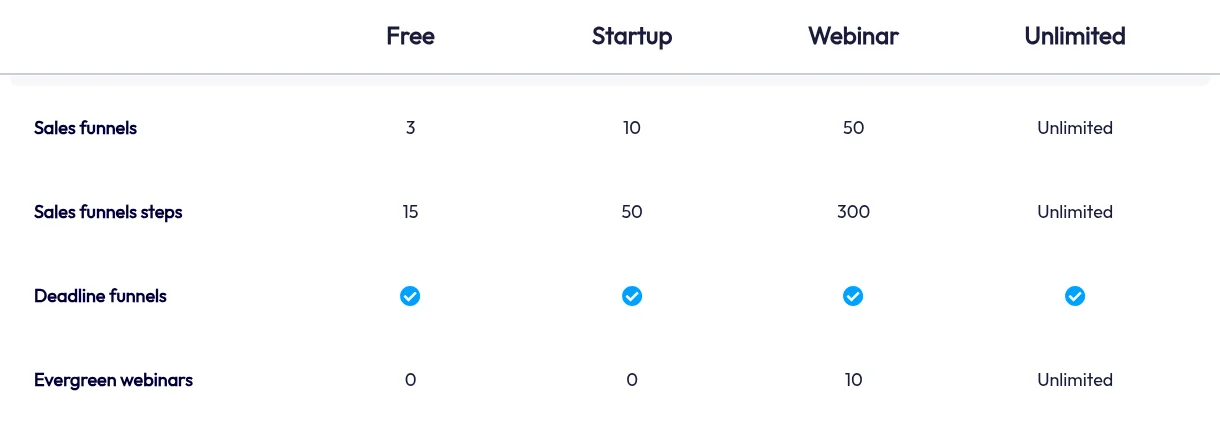
| Evergreen webinars | 0 | 0 | 10 | Unlimited |
| Contacts | 2,000 | 5,000 | 10,000 | Unlimited |
| Sales funnels | 3 | 10 | 50 | Unlimited |
| Automation rules | 1 | 10 | 100 | Unlimited |
| Email campaigns | 1 | 10 | 100 | Unlimited |
| Transaction fees | 0% | 0% | 0% | 0% |
Our recommendation: the Webinar plan is the cheapest plan that fits. Free and Startup can’t run an evergreen webinar at all, so there’s no cheaper way to use the feature. Unlimited costs US$50 a month more and only makes sense once you outgrow one of Webinar’s limits. If you’re choosing by need:
- One to ten webinars, under 10,000 contacts: start with the Webinar plan (affiliate link).
- More than ten webinars, or past 10,000 contacts or 100 automation rules: compare the Unlimited plan (affiliate link).
- Not sure anyone will watch yet: stay on Free and test the pitch first (step 1 below).
The cost maths, with assumptions
Assumptions
- Prices are Systeme.io’s published US-dollar prices on 17 October 2026, before any tax your country adds.
- You need one to ten evergreen webinars and fewer than 10,000 contacts, so the Webinar plan fits.
- The payment fee example uses Stripe’s published standard rate for domestic cards in the US: 2.9% + 30¢ per successful transaction. Your processor, country and card mix will differ (international cards and currency conversion can add fees), so use your own processor’s rate.
- The product prices (US$197 and US$47) are examples, not recommendations or results.
- We ignore one-off costs you may already have, such as a microphone or a domain name.
Software cost per year
- Webinar plan, monthly: $47 × 12 = $564 a year.
- Webinar plan, annual: $470 a year, which is $94 less than paying monthly (about $39.17 a month).
Pay monthly while you’re testing; switch to annual once the webinar is selling and you know you’ll keep it.
How many sales cover the plan?
Break-even sales = plan cost ÷ what you keep per sale (price minus processor fee).
| Example product price | Processor fee (2.9% + 30¢) | You keep | Sales to cover $47/month | Sales to cover $470/year |
|---|---|---|---|---|
| $197 | $6.01 | $190.99 | 1 a month (0.25) | 3 a year (2.46) |
| $47 | $1.66 | $45.34 | 2 a month (1.04) | 11 a year (10.37) |
Round up, because you can’t make part of a sale. At a US$197 price point, one sale a month covers the Webinar plan; at US$47, you need two. Everything above that is margin before tax, ad spend and your time.
Worksheet: separate tools vs one plan
Fill in the monthly prices from your own invoices or the vendors’ pricing pages, for the contact count you actually have:
| What you need | Separate tool (your price) | On Systeme.io Webinar plan |
|---|---|---|
| Automated webinar software | $____ | Included (10 webinars) |
| Email marketing tool | $____ | Included (unlimited sends, 10,000 contacts) |
| Page builder or website | $____ | Included (50 funnels) |
| Checkout or course platform | $____ | Included (0% transaction fees) |
| Connector between tools | $____ | Usually not needed for in-platform steps |
| Monthly total | $____ | $47 (or about $39.17 on annual) |
If your separate-tool total is more than $47 a month, the Webinar plan costs less in software. If it’s less, check what you’d be giving up before switching. Processor fees apply either way, so leave them out of this comparison. Run your own numbers in our software cost calculator, which does the same sum for your whole stack.
Set it up for the lowest cost
1. Test your pitch on the free plan first
Before paying for webinar features, record your presentation and put it on a normal funnel page on the free plan, with an opt-in form in front of it. Systeme.io lets you upload a video file to any funnel page (up to 2GB per file, with unlimited storage on every plan). This isn’t a webinar (there’s no session schedule, reminder emails or timed offer), but it tells you for US$0 whether people sign up and watch. Our beginner’s funnel guide covers building that free funnel.
2. Upgrade to the cheapest plan that includes evergreen webinars
When the pitch is getting views, upgrade to the Webinar plan. Pay monthly at first; the annual price saves $94 a year once you’re committed.
3. Create the webinar funnel and set the session schedule
Per Systeme.io’s help article: go to Sites > Sales Funnels > Create, name the funnel, choose Run an evergreen webinar as the goal, and save. Pick a template for the registration page, add the registration form in a popup, and configure the webinar registration date element. It’s mandatory. The thank-you and broadcast pages can’t be opened by URL, only after someone registers, so preview them inside the editor.
4. Add your recording and a timed offer
Upload or link your recording on the broadcast page. Then add a buy button timed to appear when your pitch starts and link it to a Systeme.io checkout page. The feature page says buyers are then enrolled in the course and added to your customer list automatically. If you want real urgency, Systeme.io’s pricing table includes deadline funnels on every plan; keep any deadline honest.
5. Set up reminder and replay emails
Per the webinar emails help article: open the registration page’s Emails tab, click Create, and choose the trigger: Registration to webinar or Webinar starts. Set a delay (for example, 15 minutes before the start) and paste the variables {webinar_show_link} and {webinar_replay_link} into the email so each registrant gets their own links. A simple set: a confirmation on registration, a reminder shortly before, and a replay email afterwards.
6. Run the break-even numbers every month
Once a month, divide your plan cost by what you keep per sale. If you’re comfortably above break-even and know you’ll keep the webinar running, switch to annual. If you’re near the Webinar plan’s limits (10 webinars, 10,000 contacts, 100 automation rules), that’s the point to look at Unlimited, and not before.
Who this isn’t for
- You want live webinars with live Q&A. Systeme.io doesn’t run live webinars; you’d need a separate live-video tool.
- You run date-specific launches. Evergreen webinars can’t be pinned to a calendar date.
- You only need a lead magnet and a short email sequence. You don’t need a webinar at all; the free-plan ebook guide is cheaper.
Related guides
- Systeme.io review for digital products: the full plan-by-plan breakdown.
- Sales funnels for complete beginners: build and test a funnel on the free plan.
- Which payment options work in your country: check your checkout before you build the funnel.
Ready to build it?
Prices and plan limits checked on systeme.io/pricing on 17 October 2026; Stripe’s US card rate checked on stripe.com/pricing the same day. Plans change, so confirm on the pricing page before you buy.