Which payment options work in your country on Systeme.io? (India, Nigeria and more)
Disclosure: some links are affiliate links. We may earn a commission at no extra cost to you; it doesn't change what we recommend. How we make money.
On this page
Most “how to sell online” guides quietly assume you live in the US or Europe. If you’re in India, Nigeria, Kenya or the Philippines, the first question isn’t which platform has the nicest pages. It’s whether you can take money at all, in a currency your buyers have, without their cards failing at checkout.
This guide answers that for Systeme.io: which payment gateways it connects to, who can open each one, which buyers and currencies each covers, and what that means if you sell from India or Nigeria. Where the honest answer is “it may not fit your country yet”, we say so.
How this guide was put together: every gateway rule comes from Systeme.io’s own pricing page and its English help centre’s gateway articles, and every country-availability claim was checked against the payment processor’s own website, all on 17 October 2026. Each section links to its sources. Payment rules change often (several of these help articles were updated in the last three months), so check the linked pages before you build. We haven’t processed live payments in these countries for this guide, so there are no invented success stories here.
The short answer
- Systeme.io doesn’t process payments itself. You connect your own account with a payment processor, so the processor decides whether you can sign up and Systeme.io decides which of its buyers and currencies it will charge in.
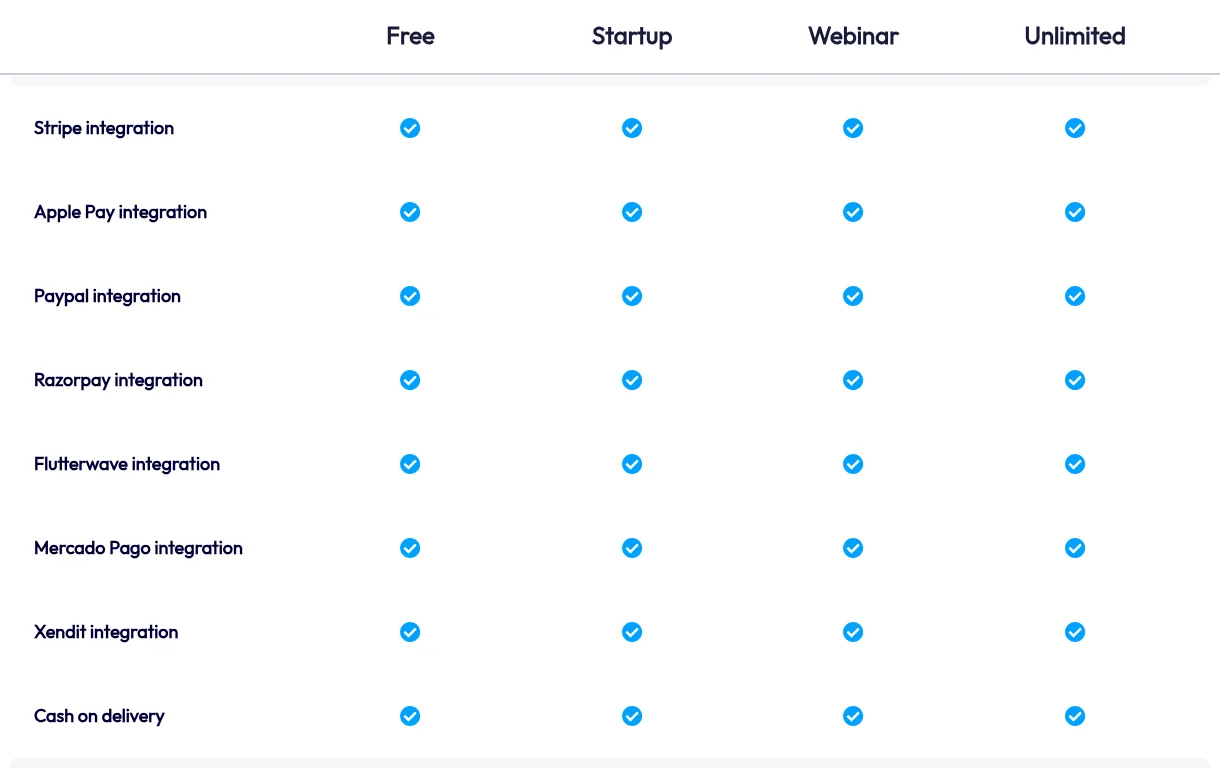
- Systeme.io’s pricing table ticks Stripe, Apple Pay, PayPal, Razorpay, Flutterwave, Mercado Pago, Xendit and cash on delivery on every plan, including Free. There are no transaction fees on any plan; the processor’s own fees still apply.
- India: Razorpay is the gateway Systeme.io documents for Indian buyers and INR, and it requires an India-registered Razorpay account. Stripe is invite-only for new Indian businesses, and PayPal India can’t receive domestic payments.
- Nigeria: Flutterwave is the gateway Systeme.io documents for Nigerian merchants (it charges in NGN and requires an African-registered Flutterwave account). Stripe’s own country page doesn’t offer a direct Stripe sign-up for Nigeria. We could not confirm that Paystack works with Systeme.io today; see the Paystack note below.
You can connect and test any of the listed gateways on the free plan before paying for anything (open a Systeme.io account, affiliate link; it starts on Free).
Every gateway Systeme.io documents, at a glance
From each gateway’s English help article on help.systeme.io, checked 17 October 2026. “Merchant rule” is where your processor account must be registered; “buyers” is who can pay you.
| Gateway | Merchant rule (your account) | Buyers | Currencies (summary) | Subscriptions | On pricing table? |
|---|---|---|---|---|---|
| Stripe (card) | Any country Stripe supports | Worldwide | 46, incl. USD, EUR, GBP, INR, NGN, ZAR, PHP, IDR | Yes | Yes |
| Apple Pay (via Stripe) | As Stripe, but blocked for India-registered Stripe accounts | Worldwide, on Apple devices | Same 46 as Stripe card | Yes | Yes |
| PayPal | No restriction listed; needs a PayPal Business account | Worldwide | 25, incl. USD, EUR, GBP, AUD, PHP; not INR or NGN | Yes | Yes |
| Razorpay | Registered in India | India | One-time: INR, LKR, PEN, VND; subscriptions INR only | INR only | Yes |
| Flutterwave | Registered in an African country | Africa and international | 23, incl. NGN, GHS, KES, ZAR, USD, EUR, GBP | Yes | Yes |
| Mercado Pago | Same country as the currency you charge; one country per Systeme.io account | Argentina, Brazil, Chile, Colombia, Mexico | ARS, BRL, CLP, COP, MXN | Yes | Yes |
| Xendit | Registered in Indonesia, or in the Philippines | Indonesia / Philippines | IDR / PHP and USD | Yes | Yes |
| Cash on delivery | n/a | n/a | n/a | n/a | Yes (physical products only) |
| Mollie | “European (EU) account” | Worldwide | 28, incl. EUR, GBP, USD | Yes | Not listed |
| GoCardless (direct debit) | Set up to collect from the buyer countries | UK, SEPA/Eurozone, Sweden, Denmark, Australia, New Zealand, Canada, US | AUD, CAD, DKK, EUR, GBP, NZD, SEK, USD | Yes | Not listed |
| Secure and Pay | No restriction listed by Systeme.io | Worldwide | EUR, GBP, USD | Yes | Not listed |
Stripe also offers local methods through the same connection: iDEAL (Netherlands), Bancontact (Belgium) and Multibanco (Portugal), all in EUR, plus Klarna where your Stripe account’s country supports it. Mollie, GoCardless and Secure and Pay have help articles but don’t appear in the pricing table’s integration list, so check under Settings > Payment gateways in your own account before you plan around them.
Selling from India
What Systeme.io documents: Razorpay is the gateway built for Indian buyers. Its rules on Systeme.io:
- your Razorpay account must be registered in India;
- buyers: India;
- one-time payments in INR, LKR, PEN or VND; subscriptions in INR only;
- your order form must include Email, First name, Last name and Phone number, or Razorpay payments can’t be processed.
What the processors say:
- Razorpay’s own account setup guide covers both unregistered individual businesses (signing up with a personal PAN) and registered businesses, with KYC either way. So you don’t need a company to start, but you do need to complete Razorpay’s verification.
- Stripe: new accounts are invite-only in India. Indian businesses “are not able to sign up for a new Stripe account through our website”, and existing accounts continue to be supported (Stripe support). Stripe’s global availability page marks India as “Preview”. Systeme.io also notes that Apple Pay is blocked for India-registered Stripe accounts.
- PayPal India: “you can’t receive domestic payments”, but you can receive payments from international customers (PayPal India help). Systeme.io’s PayPal currency list doesn’t include INR either.
What that means in practice:
| You are… | Documented route on Systeme.io |
|---|---|
| An Indian seller with Indian buyers | Razorpay (India-registered account, INR) |
| An Indian seller with mostly overseas buyers | PayPal Business (international payments only), or Stripe if you already have an Indian Stripe account or get an invite |
| A seller outside India with Indian buyers | Stripe card supports INR and worldwide buyers on Systeme.io |
About Indian buyers’ cards failing at checkout: we can’t promise that any gateway fixes this. Card authentication depends on the buyer’s bank, the processor and the payment method. What you can do is test before you launch: make a small real purchase with a card issued in India (yours or a friend’s), check it completes and that access is granted, then refund it.
Selling from Nigeria
What Systeme.io documents: Flutterwave is the gateway for African merchants. Its rules on Systeme.io:
- your Flutterwave account must be registered in an African country;
- buyers: Africa and international;
- 23 currencies including NGN, GHS, KES, ZAR, USD, EUR and GBP; subscriptions supported;
- the email field must be on the order form or the payment fails;
- refunds for Flutterwave payments are disabled by default: contact Flutterwave support to enable them. Systeme.io also says a failed payment is retried three more times, 30 minutes apart.
What the processors say:
- Flutterwave publishes account requirements per country, including Nigeria; for Nigerian merchants, the contact name on the account must match the name on your BVN and NIN. It also has a “Starter” category for businesses without a certificate of incorporation.
- Stripe: its global availability page labels Nigeria “Extended network” and links to a Paystack page rather than to a Stripe sign-up. In other words, Stripe doesn’t offer Nigerian businesses a direct Stripe account from that page, and Systeme.io’s Stripe connection is to a Stripe account.
- PayPal Nigeria: PayPal’s Nigeria help page says feature availability differs by market, some services may be cross-border only, and new Nigerian customers must link a partner bank to start receiving money. Systeme.io requires a PayPal Business account and its PayPal currency list doesn’t include NGN, so check what your PayPal account can actually receive before relying on it.
What that means in practice: for a Nigerian seller, Flutterwave is the route Systeme.io documents today, with prices in NGN for local buyers or USD, GBP or EUR for international ones.
The Paystack question
We could not confirm that Paystack currently works with Systeme.io, so we don’t recommend planning around it. On 17 October 2026:
- Paystack is not listed in the pricing table’s payment integrations, or in the English help centre’s Payments section;
- the English help article “How to integrate Paystack with systeme.io” (still linked from another help article) returns “Page not found”;
- some translated Systeme.io help centres still carry older Paystack setup articles, and Systeme.io announced Paystack as a new processor on LinkedIn in early 2024;
- at least one Nigerian user reported this month that Paystack was disabled for Systeme.io users in Nigeria. That’s a single unverified report, but it matches the missing English article.
If you need Paystack, ask Systeme.io support in writing whether it’s available for your account and country before you build anything.
Other countries in brief
| Where you’re based | Documented Systeme.io options | What the processor’s own site says |
|---|---|---|
| Kenya, Ghana, South Africa | Flutterwave (African-registered account; KES, GHS, ZAR) | Flutterwave lists requirements for all three. Stripe’s page marks all three “Extended network” and links to Paystack pages. Stripe card doesn’t list KES or GHS as currencies on Systeme.io |
| Philippines | Xendit Philippines (PH-registered account; PHP, USD); PayPal (PHP is supported) | Xendit onboards Philippine businesses. The Philippines isn’t on Stripe’s global availability list |
| Indonesia | Xendit Indonesia (ID-registered account; IDR) | Xendit onboards Indonesian businesses. Stripe marks Indonesia “Preview” |
| Argentina, Brazil, Chile, Colombia, Mexico | Mercado Pago (account in the same country as the currency; one country per Systeme.io account), plus Stripe where available | Mercado Pago says it operates in seven countries; Systeme.io supports five of them |
| EU, UK, Switzerland | Stripe, PayPal; Mollie (Systeme.io says “EU account”); GoCardless direct debit | Mollie onboards companies in the EEA, Switzerland and the UK. Whether a UK or Swiss Mollie account meets Systeme.io’s “EU account” rule is something to confirm with support |
| US, Canada, Australia, New Zealand | Stripe, PayPal; GoCardless direct debit | All four are on Stripe’s list. GoCardless onboards businesses there (US via its sales team) |
If your country isn’t on any processor’s list above, the honest answer is that Systeme.io may not fit your country yet. Check Stripe’s list and PayPal’s country list first, since those cover the most countries.
How to set up the right gateway (5 steps)
1. Check you can open an account with the processor
Use the processor’s own country page (linked above), not a third-party list, and check Systeme.io’s merchant rule in the table. Most processors verify your identity and business (Razorpay KYC, Flutterwave’s per-country documents, Xendit business verification), so start this early: you can build pages while you wait.
2. Pick a funnel currency the gateway supports
Systeme.io’s gateway articles all say the same thing: set your funnels and products up in a currency the gateway supports before taking payments. For example, INR works with Stripe card and Razorpay but not with PayPal; NGN works with Stripe card and Flutterwave but not with PayPal.
3. Connect the gateway
Click your profile picture > Settings > Payment gateways and click Connect next to the gateway, then follow its steps (some, like Razorpay and Flutterwave, need API keys and a webhook pasted into the processor’s dashboard, as described in each help article).
4. Turn it on in the funnel and add the required fields
Open the funnel’s Funnel settings and tick the payment method (activating Stripe or PayPal; GoCardless and cash on delivery work the same way). Then check the order form has every field the gateway requires:
| Gateway | Required order-form fields (per Systeme.io) |
|---|---|
| Stripe | Email, First name |
| PayPal | Email, First name, Last name |
| Razorpay | Email, First name, Last name, Phone number |
| Flutterwave, Mollie, GoCardless | |
| Secure and Pay | Email, First name, Last name |
5. Test with a real card from your buyers’ country
Make a small real purchase using a card or wallet your buyers actually use, confirm the thank-you page and access work, then refund it (remember Flutterwave refunds are off until Flutterwave enables them). Our ebook selling guide walks through building the order form and test purchase step by step.
Which plan do you need for this?
None of this needs a paid plan: the pricing table ticks every listed gateway on Free, with 0% transaction fees. Upgrade for the usual reasons (more funnels, automation rules or contacts), not for payments.
New to building a checkout at all? Start with sales funnels for complete beginners. Comparing what you pay for tools now? Try the software cost calculator.
Quick answers
Does Systeme.io take a cut of my sales? No: 0% transaction fees on every plan, per its pricing page. Your payment processor charges its own fees.
Can Systeme.io hold my money? Systeme.io itself doesn’t hold your sale money: buyers pay into the Stripe, PayPal or other payment account you connect yourself (Systeme.io’s help articles on connecting Stripe and connecting PayPal, checked 2 November 2026). Your payment processor can still hold or review funds under its own rules, for example a Stripe reserve or a PayPal payment hold. And if your Systeme.io account is restricted or blocked, you can’t take new sales through it until that’s resolved: on a restricted Free account, payments stop working (help 1086), and the terms allow Systeme.io to block access under its fair-use policy.
Can I connect more than one gateway? Yes. The funnel settings let you tick more than one method (for example card and PayPal), so you can offer local and international options side by side, as long as each one supports the funnel’s currency.
Is Paystack supported? We couldn’t confirm it on 17 October 2026 (see above). Ask Systeme.io support before relying on it.
Can I sell digital products with cash on delivery? No. Systeme.io says cash on delivery is only for physical products.