Sales funnels for complete beginners: build your first one (2 pages, 3 emails), free to start
Disclosure: some links are affiliate links. We may earn a commission at no extra cost to you; it doesn't change what we recommend. How we make money.
On this page
“Build a funnel” is advice beginners hear constantly and rarely get explained. This guide does both: what a sales funnel actually is, then how to build the smallest one that works, which is two pages and three emails, and you can build it without paying a monthly fee.
We use the Systeme.io free plan as the worked example because the pages, the email sequence and the checkout all sit in one account, so there’s nothing to connect together. Free is the right place to test whether your first funnel works. It is not built for a business with several products and sequences, and this guide shows exactly where Startup (US$17/month) takes over.
How this guide was put together: every menu path, feature and limit comes from Systeme.io’s own pricing page and help centre, checked on 23 October 2026 (the step-by-step help articles were first checked on 17 October), and each step links to its source. The advice on what to put in your emails is general good practice, not a Systeme.io rule. We haven’t run this funnel on a live audience for this guide, so you won’t find invented opt-in rates or “this made $X” claims. The screenshot is of Systeme.io’s public pricing page, captured on the same date.
What a sales funnel actually is
A sales funnel is just the path from “never heard of you” to “paid you”, built so it runs without you. Strip away the jargon and most beginner funnels have three parts:
- A free thing in exchange for an email address. A one-page checklist, a template, a short guide. The page that asks for the email is called an opt-in page.
- A few emails that help first and sell second. These go out automatically, a day or two apart. A set of emails sent in order is called a sequence or, in Systeme.io, a campaign.
- A page where people can pay. Your order form (checkout).
That’s it. Upsells, webinars and countdown timers are things you can add later; none of them are needed to make your first sale.
Systeme.io’s funnel builder offers four starting shapes (how to create a funnel):
| Funnel type | What it starts with | Use it for |
|---|---|---|
| Build an Audience | Opt-in page + thank-you page | Growing your email list (this guide) |
| Sell | Order form + thank-you page | Taking payment (our ebook guide builds one) |
| Custom | A blank funnel; add steps yourself | Combining both once you’re comfortable |
| Run an evergreen webinar | A 3-page webinar funnel | Webinar and Unlimited plans only |
Free vs Startup for this funnel
The numbers that matter for a first funnel, from the comparison table on systeme.io/pricing and the help centre on 23 October 2026:
| Limit | Free | Startup (US$17/mo) | What this guide uses |
|---|---|---|---|
| Sales funnels | 3 | 10 | 2 (this one + your Sell funnel) |
| Funnel steps (pages) | 15 | 50 | 4 (2 here + 2 in the Sell funnel) |
| Email campaigns (sequences) | 1 | 10 | 1 (the 3-email sequence) |
| Automation rules | 1 | 10 | 1 (form → campaign) |
| Tags | 1 | 10 | 1 (optional, to mark subscribers) |
| Contacts | 2,000 | 5,000 | Everyone who signs up |
| Lifetime sales | US$10,000 | Free cap doesn’t apply | Your paid product’s sales |
| Systeme.io badge | Can’t be removed | Removable | Shown on your opt-in page |
| Emails sent / newsletters | Unlimited | Unlimited | Broadcasts to your list later |
| Transaction fees | 0% | 0% | Only your payment processor’s fee |
Sales cap: help article 1509. Badge: help article 286; free-plan emails also carry a “Sent with systeme.io” footer (help article 2008).
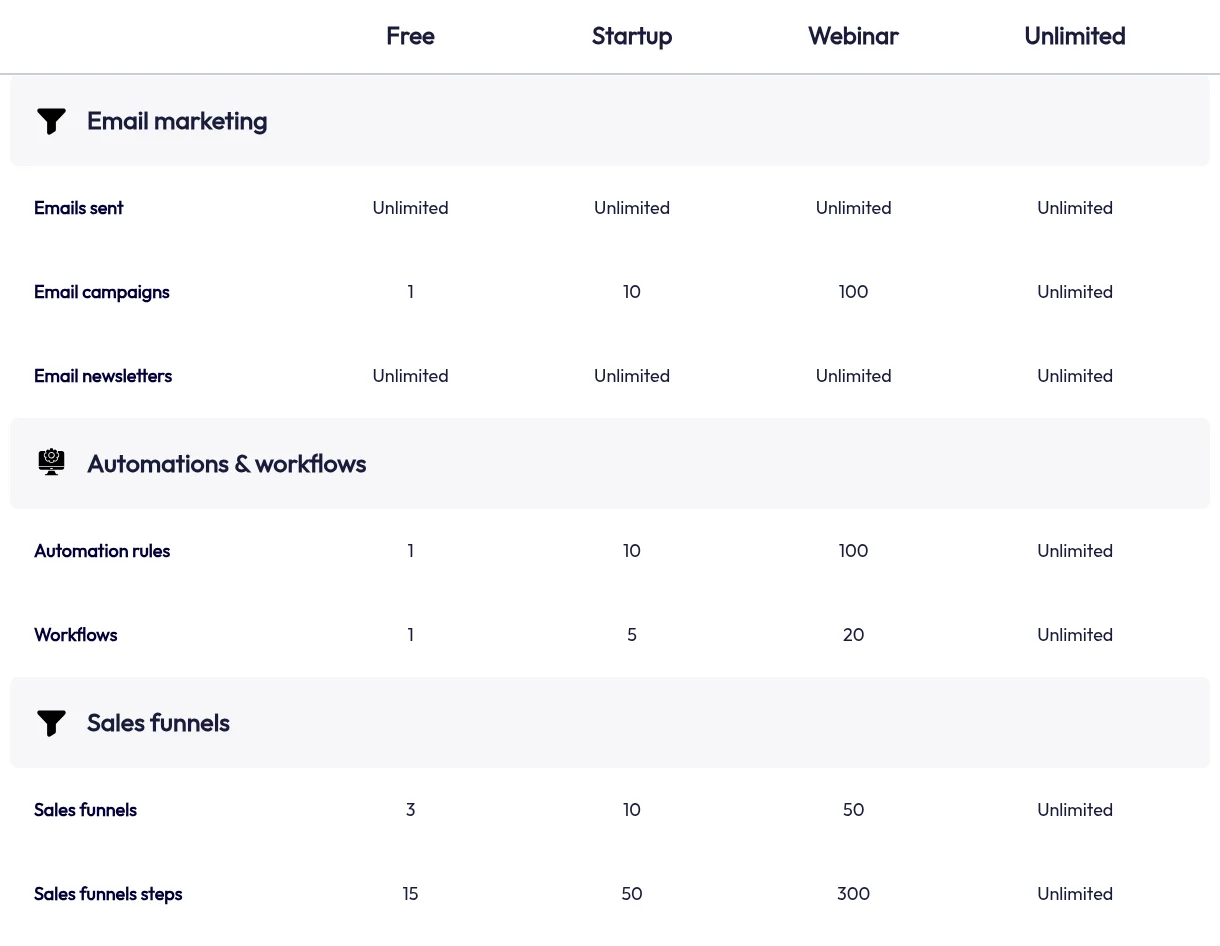
If you build this on Free: you get one automation rule and one campaign, so this funnel spends them on the one job that runs while you sleep: moving new subscribers into your email sequence. Everything else (the freebie, and later the paid file) is delivered on thank-you pages, which don’t need a rule.
Want to follow along as you read? Open an account first (create a Systeme.io account, affiliate link; every account starts on Free, no card needed). If you already have a product selling and want a sequence per product, upgrade to Startup before you build, so you don’t have to rework the rules later.
Step 1: Pick the freebie and the paid product it leads to
Decide both ends before you build anything. The freebie should solve one narrow problem quickly, and the paid product should be the obvious next step for someone who found the freebie useful.
- A freebie checklist “10 things to fix on your sales page” leads naturally to a paid sales-page template.
- A free one-week meal plan leads to a paid 8-week plan.
- A free budgeting spreadsheet leads to a paid course on using it.
If you don’t have a paid product yet, you can still build the list now and add the offer email later.
Step 2: Sort out your sender email address
This is the step most beginner tutorials skip, and it decides whether your emails arrive.
- Gmail and Yahoo addresses can’t be used as your sender on Systeme.io; Gmail has been blocked as a sender since 16 July 2024. Systeme.io also advises against Outlook/Hotmail addresses even though they’re technically allowed (personal email addresses).
- Use an address on your own domain (for example a “hello” address on yourdomain.com). Set it under your profile picture > Settings > Emails (change the sender address) and confirm it under Verified email addresses (confirm your sender address).
- Authenticate the domain by adding the three CNAME records and a DMARC record Systeme.io gives you to your domain’s DNS. Systeme.io’s help centre calls this mandatory for sending emails, and says the domain should have a working website (authenticate your domain).
No domain yet? You’ll need to register one with a domain registrar first (that’s a separate, small yearly cost). The free plan includes one custom domain (Startup includes 3), so the same domain can host your pages too.
Step 3: Create a Build an Audience funnel
- Go to Sites > Sales funnels and click Create.
- Enter a name, select your domain and currency.
- Choose Build an Audience. It comes with an opt-in page and a thank-you page.
(How to create a funnel.) Pick a template for the opt-in page and open it in the editor. Keep the page short: a headline that names the problem, three bullet points on what’s in the freebie, the form, and nothing else to click.
Step 4: Set up the opt-in form
On the opt-in page, check the form:
- There must be an Email field. Without one, the page shows an error (“At least one email input is required”) when you try to save (build your list with a funnel). A first-name field is optional but makes emails friendlier.
- Set the button’s action to “Submit form”. This saves the person as a contact, and it’s what makes the automation rule in Step 7 fire (how to configure a button).
- Redirect “To the next step”, so people land on the thank-you page after signing up.
If you use the newer Form element, its Actions tab also has a Double opt-in checkbox, and you can add an extra checkbox field, for example a consent line (form fields and the Form element). Whether you need either depends on the email and privacy rules where you and your subscribers are; when in doubt, ask clearly and keep a record.
Step 5: Put the freebie on the thank-you page
Open the thank-you page and add a button with the action Download file, then upload your freebie (button actions). People get the file the instant they sign up, and you haven’t used an automation rule to deliver it.
Add one line under the button: “Watch your inbox: I’ll send you [the useful thing] tomorrow.” It sets up the emails that follow.
Step 6: Write a 3-email campaign
Create the sequence under Emails > Campaigns > Create: give it a name, choose your sender address and save. Open the campaign and create each email (subject, sender name, sender address, then the classic or visual editor). Then activate each email from the three-dots menu and set which email it follows and the delay (how to set up an email campaign). Use Save and test to send yourself a copy of each one.
A simple three-email shape that works for most beginner funnels (our suggestion, adjust freely):
| When | What it does | |
|---|---|---|
| 1. Welcome | Shortly after sign-up | Re-links the freebie, says who you are and what’s coming |
| 2. One useful tip | About 2 days later | Helps with the problem, with no pitch; builds trust |
| 3. The offer | About 2 days after that | Explains the paid product, who it’s for, the price, and links to your order page |
Keep the emails short and light. Systeme.io’s campaign guide warns that heavy HTML (lots of images, fonts and layout) can hurt deliverability. Every marketing email should make clear who it’s from and how to unsubscribe.
Step 7: Connect the form to the campaign with one automation rule
This is the only automation the funnel needs:
- Open the opt-in page in your funnel, go to the Automation Rules tab and click Add rule (or go to Automations > Rules > Create).
- Add the trigger Funnel step form subscribed and choose your opt-in page.
- Add the action Subscribe to campaign and pick the campaign from Step 6.
- Optionally add a second action, Add a tag, so you can tell these subscribers apart later.
- Click Save rule.
(Sources: automate an email sequence, send an email when a lead subscribes.) That uses your one free rule, your one campaign and, if you add it, your one tag.
Step 8: Test it as a subscriber
Systeme.io recommends testing by registering on your own opt-in page (send an email when a lead subscribes). Use an email address that isn’t your sender address, ideally on your phone, and check:
- you land on the thank-you page and the download works;
- you appear in your contacts (with the tag, if you added one);
- email 1 arrives, and isn’t in spam;
- the link in email 3 opens your order page.
Step 9 (when you’re ready): add the paid step
Your third email needs somewhere to send people. Build a Sell funnel with an order form and a thank-you page by following our step-by-step ebook selling guide; it works the same for a template, a workbook or a short course. Because this funnel has used your one automation rule, deliver the paid file with a Download file button on the Sell funnel’s thank-you page, which needs no rule.
Prefer one funnel? The Custom type lets you chain an opt-in page, sales page, order form and thank-you page, and Systeme.io documents the order the steps must be in and how the buttons link them (link between funnel pages). Two simple funnels are easier to get right first time.
When you’ll need Startup
Free proves the funnel works. Move to Startup (US$17/month or US$170/year), the cheapest paid plan, when any of these is true:
- You want a delivery email for the paid product too, or a separate sequence for buyers. That needs a second automation rule or campaign (Free: 1 each; Startup: 10 each).
- A second freebie with its own sequence (another campaign and rule).
- You want your pages and emails to carry your brand only. The Systeme.io badge and email footer come off only on a paid plan.
- Your product sales are heading towards US$10,000 in total. At that point Free’s payment pages stop taking new sales until you upgrade.
- More than 3 funnels, or more than 2,000 contacts.
You only need the Webinar plan (US$47/month) for evergreen webinars or more than 5,000 contacts (see what an evergreen webinar funnel really costs).
Not sure an all-in-one setup beats what you pay for now? Add up your current tools in the software cost calculator, and read our Systeme.io review for the weaknesses as well as the strengths.
Common beginner mistakes
- Using a Gmail address as the sender. It’s blocked; get a domain address first.
- Leaving the button on “Open URL” instead of “Submit form”, so nobody is saved as a contact and the rule never fires.
- Spending the one automation rule on delivering the freebie. Use the thank-you page for that and save the rule for the sequence.
- Pitching in the first email. Deliver and help first; the offer can wait two emails.
- Not testing as a subscriber, on a phone, before sharing the link.
Quick answers
Do I need a website? No. The opt-in page has its own link you can put in your bio.
How many funnels can I build on Free? Three. The pricing table also lists 15 “sales funnel steps” (pages) on Free; this guide’s two funnels use four.
Can I start without a paid product? Yes. Build the list now; write email 3 when the product exists.
Is there a catch on Free? Three, all stated by Systeme.io: lifetime sales are capped at US$10,000, the badge on your pages can’t be removed, and free accounts with no activity for 6 months are deactivated. For testing a first funnel none of them get in the way; for a business you rely on, they’re the reason to move to Startup.