How to sell your first ebook on a free plan, and when you'll need Startup (step by step)
Disclosure: some links are affiliate links. We may earn a commission at no extra cost to you; it doesn't change what we recommend. How we make money.
On this page
You’ve written the ebook. You don’t want to pay a monthly fee for a store before you’ve made a single sale, and you’d rather not hand a cut of every sale to a marketplace either. This guide walks through selling it from your own page with your own checkout, starting on a plan that costs nothing per month, and shows exactly where that plan stops and Startup begins.
We use the Systeme.io free plan as the worked example, because it puts the page, the checkout, file delivery and email in one account, and the steps are identical on Startup if you upgrade later. Think of Free as a test bed for one book: it’s enough to find out whether people buy, not a long-term home for a growing catalogue. The steps work the same way for a template pack, a workbook or a checklist.
How this guide was put together: every menu path, feature and limit below comes from Systeme.io’s own pricing page and help centre, checked on 23 October 2026 (the step-by-step help articles were first checked on 17 October). Each step links to the help article it’s based on. We haven’t sold an ebook through a Systeme.io account for this guide, so you won’t find invented sales figures or “we made $X” claims. The only screenshot is of Systeme.io’s public pricing page, captured on the same date. Menus can change, so if a button has moved, the linked help article is the place to check.
Already selling somewhere that takes a cut?
If you sell through a marketplace or store that takes a percentage of each sale, or charges a monthly fee, put your real numbers into the calculator: last month’s sales and the fee you paid. If your own checkout costs less after processor fees, keep your existing listing running and add your own page alongside it. If you already sell more than one product, or your total sales are heading past US$10,000, skip the free test and start on Startup (US$17/month), because Free’s limits are built for one product. You don’t have to switch everything on day one.
Moving off a platform that’s closing? Use the migration checklist.
What you need before you start
- The finished ebook as a PDF. If you want to send it as an email attachment, keep it under 5 MB, which is the attachment limit in Systeme.io’s ebook help article. A bigger file can still go out as a download link.
- A price, and a decision on whether it’s a one-off payment (usual for an ebook).
- A Stripe or PayPal account in your name or your business’s name. Systeme.io charges no platform fee, but the payment processor’s own fees still apply.
- A short description of who the book is for and what’s inside. You’ll paste this into the order page in Step 5.
- One focused working session. Nothing here needs code.
What the free plan gives you for this (and what it doesn’t)
These are the free-plan limits that matter for selling one ebook, taken from the comparison table on systeme.io/pricing and the help centre on 23 October 2026. The first two rows are the ones most free-plan guides leave out:
| Free plan feature | Limit on Free | Why it matters for an ebook |
|---|---|---|
| Lifetime sales | US$10,000 in total, ever | A banner appears at US$8,000; at US$10,000 payment pages stop taking sales until you upgrade (help article 1509) |
| Systeme.io badge | Can’t be removed | Buyers see Systeme.io branding on your pages (help article 286); emails carry “Sent with systeme.io” (help article 2008) |
| Price | No monthly fee, no card needed | Nothing to pay while you test |
| Transaction fees | 0% | Only the processor’s fee comes off each sale |
| Sales funnels | 3 | One funnel per product is plenty to start |
| Funnel steps (pages) | 15 | A Sell funnel starts with 2 pages |
| Contacts | 2,000 | Buyers become contacts |
| Automation rules | 1 | Enough for one automatic delivery email |
| Tags | 1 | Use it to mark buyers |
| Email campaigns (sequences) | 1 | One follow-up sequence |
| Emails sent and newsletters | Unlimited | Broadcasts to your list cost nothing extra |
| File storage | Unlimited | Host the PDF in the same account |
| Custom domains | 1 | Use your own domain if you have one |
| Order bumps / 1-click upsells / coupon codes | 1 each | Room to test one add-on and one discount |
The table also ticks Stripe, PayPal, Apple Pay, Razorpay, Flutterwave, Mercado Pago and Xendit on the Free plan, so you can take card and PayPal payments without upgrading.
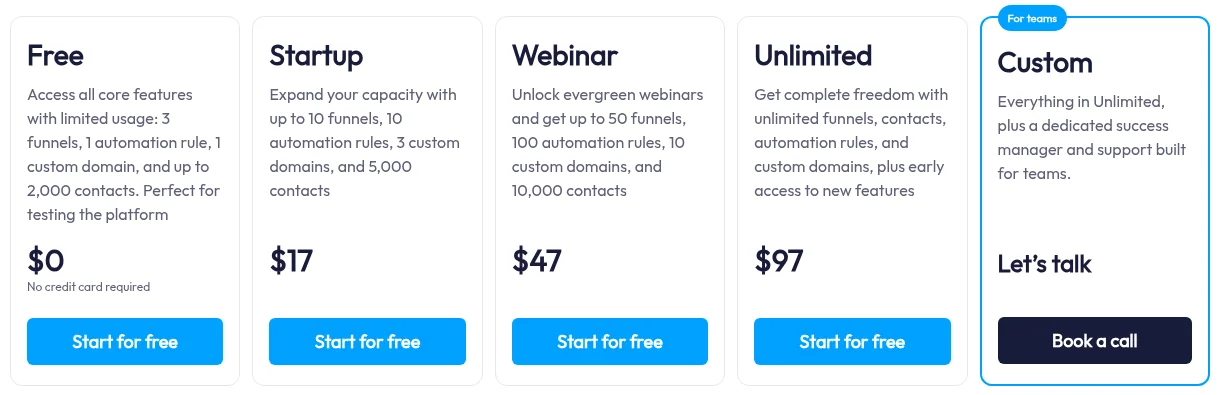
The limits to plan around: the free plan has one automation rule and one tag. That’s enough for one ebook if you spend them on purpose, which is what Step 4 is about. The sales cap and the badge are the other two: fine for a test, but they’re why Free isn’t meant to be where a growing ebook business lives.
Step 1: Create a free account and connect payments
Open an account (create a Systeme.io account, affiliate link) with your email address. Every account starts on Free; if you already know you’ll sell more than one product, you can upgrade to Startup from your dashboard now and skip the workarounds in Step 4. Then connect a way to get paid:
- Click your profile picture, then Settings, then Payment Gateways in the left menu.
- Click Connect next to Stripe. You’ll be sent to Stripe to log in or create an account, choose the country your business is registered in and your business type, and verify your details.
- Click Authorize access and you’ll land back in Systeme.io.
One detail that trips people up: Stripe needs the Email and First Name fields on your payment pages, so leave both on the order form. (Source: How to connect your Stripe account.) PayPal can be connected from the same Payment Gateways page. Selling from India, Nigeria or elsewhere outside the US and Europe? Check which payment options work in your country first.
Step 2: Create a Sell funnel
A “funnel” in Systeme.io is just a set of pages that work together. For an ebook you need two: a page where people pay, and a page they see after paying.
- Go to Sites > Sales funnels and click Create.
- Enter a name (for example the ebook’s title), select your domain and choose the currency you want to charge in.
- Pick the Sell funnel type. It comes preset with an order form and a thank-you page.
That uses 1 of your 3 funnels and 2 funnel steps (the pricing table lists 15 steps on Free). (Source: How to create a funnel.)
Then open the funnel’s Funnel settings, tick Credit card or debit card and/or PayPal, and save, so the payment methods you connected show on the order form. (Source: How to activate payments by Stripe or PayPal.)
Step 3: Add the ebook as a digital product with a price plan
- Click the order form step and select Digital product as the offer type.
- Click the + next to Digital Product to add a new resource, and name it in the Digital product name field.
- Click the + to set up a price plan, then Create a new one. Fill in the display name for your dashboard, the name shown on the order form, and the statement descriptor (what appears on the buyer’s bank statement, so make it recognisable).
- Choose One-time payment, enter the amount, set the tax behaviour, and click Save. Then click the main Save button.
Subscriptions and payment plans are also available here if you later sell something recurring. (Source: How to create and configure a price plan.)
Setting a price under US$10? Read Pricing under $10 first: the fixed part of a card fee takes a big share of a cheap sale.
On tax: selling digital products can create GST, VAT or sales-tax obligations depending on where you and your buyers are. The tax behaviour setting controls how the price is shown and charged; whether you need to collect tax is a question for your local tax rules or an adviser.
Step 4: Choose how buyers get the file
Systeme.io’s ebook guide describes three ways to deliver the file:
- A download link on the thank-you page. On the thank-you page, add a button and set its action to Download file, or add a text link to the file. (Source: How to add a downloadable file to the thank-you page.)
- The file attached to an email. On the funnel’s payment page, open the Automation Rules tab, click Add rule, choose the trigger New sale and the action Send email, then attach the file to that email (5 MB maximum) and save the rule. Attachments appear as links at the end of the email. (Source: How to deliver digital products via email after a sale.)
- A download link inside that email, which avoids the 5 MB limit.
Our recommendation if you’re on Free (a judgement call, not a Systeme.io rule): use the thank-you page download as the main delivery, because it doesn’t use your single automation rule. Then spend that one rule on the New Sale → Send email delivery email, so every buyer also has a copy in their inbox if they close the tab. That’s the whole delivery setup for one ebook, and it leaves your one tag free for marking buyers when you add a follow-up sequence later.
When you’re ready to sell a second product with its own delivery email, you’ll need a second automation rule. That’s usually the first real reason to move to Startup, which has 10 (see below).
Step 5: Write the sales copy on the order page
You don’t need a separate sales page to start: the order form is a full page you can edit. Keep it plain and answer the questions a buyer has before paying:
- Who it’s for, in one sentence, and who it isn’t for.
- What’s inside: a short chapter list or the three or four problems it solves.
- Format and length: PDF, number of pages, any templates or worksheets.
- The price and whether it’s a one-off payment.
- What happens after payment: “You’ll get a download button straight away and a copy by email.”
- Your refund policy and a contact email.
Only use testimonials from real readers, with their permission. If you don’t have any yet, leave that section out rather than inventing one; a clear contents list does more than a vague quote.
Step 6: Make a test purchase
Systeme.io’s help centre recommends making a test purchase to confirm everything works (delivering digital products by email). Buy your own ebook and check:
- the payment goes through and you land on the thank-you page;
- the Download file button opens the right PDF;
- the delivery email arrives and its link works;
- all of it works on your phone, because that’s where most link-in-bio buyers will be.
Then refund the test charge from your payment processor’s dashboard.
Step 7: Publish and share one link
The free plan includes one custom domain (Startup includes 3), so if you own a domain you can put the order page on it; otherwise use the default domain you selected in Step 2. Then put that one link everywhere you already show up: your bio, email signature, the end of your posts. The free plan also includes one mobile link-in-bio page if you want a simple hub.
Because there’s no platform fee, each sale only loses the processor’s fee. That makes the free plan a cheap way to find out whether people will actually buy the book before you commit to a monthly cost. Once they do, the section after next tells you when Startup earns its US$17.
Pricing under $10
Card fees are usually a percentage of the sale plus a fixed amount per sale, and the fixed part takes a much bigger share of a cheap sale. As an example, Stripe’s standard US rate for domestic cards is 2.9% + 30¢ per successful charge (stripe.com/pricing, checked 28 October 2026). Here’s what that rate leaves at three prices (before rounding and before any tax):
| Price (US$) | Card fee at 2.9% + 30¢ | You keep | Share lost to the fee |
|---|---|---|---|
| $1 | 32.9¢ | about $0.67 | 32.9% |
| $5 | 44.5¢ | about $4.56 | 8.9% |
| $10 | 59¢ | $9.41 | 5.9% |
Treat this as an example, not your rate: rates vary by country, card type and processor. Stripe’s US page adds 1.5% for international cards and 1% if currency conversion is needed. Australian rates are different: Stripe’s Australian page lists 1.65% + A$0.30 for domestic cards and 3.5% + A$0.30 for international cards, GST included (stripe.com/au/pricing, checked 28 October 2026; the page marks lower international-card pricing from 1 April 2027). At A$5 that’s about 38¢ (7.7%) on an Australian card and about 48¢ (9.5%) on an overseas card. PayPal and other processors publish their own rates.
Why a bundle or a slightly higher price usually beats $0.99 singles. The fixed part is charged per sale, not per product. Five books sold separately at $0.99 bring in $4.95 and pay five fixed fees: about $1.64 in card fees at the example rate, leaving about $3.31 (33% lost). The same five books as one $4.95 bundle pay one fee of about 44¢, leaving about $4.51 (9% lost). A single book at $2.99 loses about 39¢, or 12.9%. This is fee arithmetic only; it can’t tell you how many people will buy at each price.
Check the payout minimum, too. Some platforms and processors hold your earnings until your balance reaches a minimum, or pay out on a schedule. At about 67¢ kept per $1 sale, a payout minimum of, say, US$100 (an example figure) would take 150 sales before any money reached your bank. Check your platform’s and processor’s payout terms before you set a very low price.
Card fees apply on any platform. Systeme.io charges 0% transaction fees on every plan, including Free, but it doesn’t process payments itself: each sale goes through the Stripe or PayPal account you connected, so that processor’s fee comes off every sale and its payout schedule applies. The payment options by country guide covers which processors you can use where you live.
When you’ll need Startup
Free is for proving one book sells. Move to Startup, the cheapest paid plan, when any of these is true:
- A second product with its own delivery email needs a second automation rule (Free: 1; Startup: 10).
- A proper follow-up sequence per product (Free includes 1 email campaign; Startup includes 10).
- You want the book to look like your business, not Systeme.io’s. The page badge and the “Sent with systeme.io” email footer can only be removed on a paid plan.
- Your total sales are heading towards US$10,000. Free’s lifetime cap stops your payment pages at that point; upgrading before you reach it avoids a pause in sales.
- More than three funnels, for example separate pages for three books plus a free lead magnet.
- More than 2,000 contacts.
When you’ll outgrow Free
| You need | Free allows | Move to |
|---|---|---|
| More than US$10,000 in total sales | US$10,000 lifetime | Startup |
| Pages and emails without Systeme.io branding | Badge can’t be removed | Startup |
| More than 1 automation rule or email sequence | 1 each | Startup (10 each) |
| More than 2,000 contacts | 2,000 | Startup (5,000) |
| More than 1 course | 1 | Startup (5) |
| More than 1 coupon code | 1 | Startup (10) |
Startup costs US$17/month or US$170/year (Systeme.io pricing page, checked 23 October 2026). You only need Webinar (US$47/month) if you plan to sell through an automated webinar or pass 5,000 contacts. Compare the plans on Systeme.io (affiliate link).
Want people to find the ebook through a free download and a short email sequence first? Our beginner’s guide to sales funnels builds that front end with the free plan’s one automation rule.
If you’re not sure whether moving to one platform saves you money compared with what you pay now, run your current subscriptions through the software cost calculator. Our Systeme.io review covers the weaknesses as well as the strengths.
Common mistakes to avoid
- Removing the First Name field from the order form. Stripe needs Email and First Name.
- Attaching a PDF over 5 MB. Use a download link in the email instead.
- Spending your only automation rule on something else and then having no automatic delivery email.
- Skipping the phone test. A broken button on mobile costs you sales you’ll never see.
- Promising results the book can’t guarantee. Describe what’s inside; let readers decide.
Quick answers
Do I need a website first? No. The Sell funnel’s order form is a public page with its own link.
Does the free plan expire? It has no end date and needs no credit card, but the pricing page FAQ says free accounts with no login or activity for 6 months are deactivated.
Is there a limit on how much I can sell on Free? Yes: US$10,000 in total sales over the account’s life. A warning banner appears at US$8,000, and at US$10,000 payment pages stop accepting new sales until you upgrade. Commissions you earn as a Systeme.io affiliate don’t count (help article 1509).
Can I sell more than one ebook on Free? You can create up to 3 funnels, so yes, but with one automation rule only one product can have its own automatic delivery email. The others can rely on the thank-you page download. If you’re selling several books, that workaround is usually the point to move to Startup.